
Last updated: June 20, 2026
How to hide cables on standing desk: Discover the best methods
Organizing cables on a standing desk can significantly enhance your workspace’s aesthetics and functionality. By effectively managing your cables, you will create a cleaner environment, reduce clutter, and minimize safety hazards. This guide will provide step-by-step instructions on how to hide cables on your standing desk, along with essential tips and tools to make the process easier.
Disclosure: As an Amazon Associate I earn from qualifying purchases.

- 【25'' Large Size】The 25'' cable management under desk provides enough space for all your…
- 【Under Desk Cable Management Tray】Our workspace organizers are suitable for the desk wit…
- 【Sturdy Structure】The cable management tray is made of sturdy metal. The mesh structure …
Before starting, ensure that you unplug all devices connected to your desk, as a safety precaution. This will help prevent any electrical mishaps while you organize your cables.
What You’ll Need
Gather the following items to efficiently hide cables on your standing desk: For optimal results, consider these additional tips:
Cable Management Tray: A tray, such as the Mzmaxy Cable Management, provides ample space for organizing multiple cables and prevents overheating.
Cable Clips: These clips help secure individual cables along the desk’s surface, keeping them in place.
Cable Ties: Useful for bundling cables together, reducing clutter, and making adjustments easier.
Vertebrae Cable Management Kit: Offers flexibility and adaptability for various desk shapes while keeping cables hidden and organized.
Power Strip Tray: Keeps power strips off the floor and hidden, making it easier to manage multiple devices.
Step-by-Step
- Assess Your Setup: Identify the number and types of cables you need to manage, such as power cords, monitor cables, and peripheral wires.
- Choose a Cable Management Solution: Select a cable management tray that fits your desk size and style. For example, a no-drill tray like the Mzmaxy Cable Management can easily clamp onto your desk.
- Install the Cable Management Tray: Follow the instructions to securely attach the tray under your desk using the clamp mechanism. Ensure it is stable and positioned for easy access.
- Organize Cables: Begin placing your cables into the tray. Group similar cables together using cable ties to prevent tangling and make it easier to identify each cable.
- Secure Loose Cables: Use cable clips to attach any loose cables along the edges of your desk. This keeps them from hanging down and creates a cleaner look.
- Route Cables Safely: Make sure that cables are not pinched or stretched. Use the vertebrae cable management kit if you need to route cables around obstacles or behind desk legs.
- Check Power Strips: If you are using a power strip, place it in the designated power strip tray. This keeps it off the floor and organized.
- Final Inspection: Double-check all connections and ensure that no cables are hanging loosely. Tidy up any remaining cables with additional ties or clips as needed.
Pro Tips for Better Results
- Label cables for easy identification, especially if you have multiple devices connected.
- Regularly check your cable management setup to ensure it remains tidy and functional.
- Choose cable management solutions that complement your desk’s aesthetics for a more cohesive look.
Common Mistakes
Avoid these common pitfalls when managing your cables:

- Overloading the cable management tray can lead to sagging or damage to the tray.
- Neglecting to secure cables can result in a messy appearance and potential safety hazards.
- Ignoring ventilation needs can cause overheating of electrical devices.
Troubleshooting
Here are some troubleshooting tips if you encounter issues:
- If cables are getting pinched, consider using a more flexible cable management solution like a vertebrae kit.
- If the tray is sagging, ensure it is properly clamped and not overloaded.
- If cables are still visible, reevaluate your cable routing and consider additional clips or ties.
What to Expect
- 【25'' Large Size】The 25'' cable management under desk provides enough sp…
- 【Under Desk Cable Management Tray】Our workspace organizers are suitable …
- Under Desk Cable Management Tray – No Drill, Clamp-On Installation. This…
- TUCKS YOUR CABLES NEATLY BEHIND YOUR DESK LEG; LOOKS GREAT & GIVES YOU P…
Maintenance / Next-Time Checklist
To maintain your cable management system, follow these guidelines:
- Regularly check for loose cables and secure them as needed.
- Dust and clean the cable management areas to prevent dust buildup.
- Evaluate your setup whenever you add new devices to ensure all cables are properly managed.
Recommended Products & Tools
Consider these products for effective cable management:
Mzmaxy Cable Management Tray: Its no-drill feature allows for easy installation, making it ideal for renters or those not wanting to modify their desks.
Cinati Vertebrae Cable Management: This flexible solution adapts to various desk shapes while keeping cables hidden and organized.
VIVO Power Strip Tray: This tray keeps power strips off the floor, maintaining a clean workspace and easy access to power sources.
FAQ
Can I use adhesive solutions for cable management?
While adhesive solutions can work, they may not provide the same stability as clamp-on options, especially for heavier cables. The best routine depends on the carafe design, how often you use it, and how carefully you handle the lid, seals, and inner lining.
How often should I check my cable management?
It’s a good idea to check your cable management setup every few months or whenever you add new devices. The best routine depends on the carafe design, how often you use it, and how carefully you handle the lid, seals, and inner lining.
Can I hide cables behind my desk?
Yes, using a cable management tray or clips can effectively hide cables behind the desk for a cleaner look. The best routine depends on the carafe design, how often you use it, and how carefully you handle the lid, seals, and inner lining.
What if my cables are too short?
Consider using cable extenders or purchasing longer cables to ensure they reach your devices comfortably. The best routine depends on the carafe design, how often you use it, and how carefully you handle the lid, seals, and inner lining.
Are there specific cable management solutions for gaming setups?
Yes, many products are designed for gaming setups, offering features like flexible routing and easy access to cables for frequent changes. The best routine depends on the carafe design, how often you use it, and how carefully you handle the lid, seals, and inner lining.
Wrap-Up
Effectively hiding cables on your standing desk can transform your workspace into a more organized and efficient area. By following the steps outlined above and utilizing the recommended products, you can enjoy a clean desk and reduce the risk of tripping hazards. Regular maintenance and attention to your cable management will help keep your workspace looking its best.
Helpful Tools & Picks
- 【25'' Large Size】The 25'' cable management under desk provides enough space for all your…
- 【Under Desk Cable Management Tray】Our workspace organizers are suitable for the desk wit…
- 【Sturdy Structure】The cable management tray is made of sturdy metal. The mesh structure …
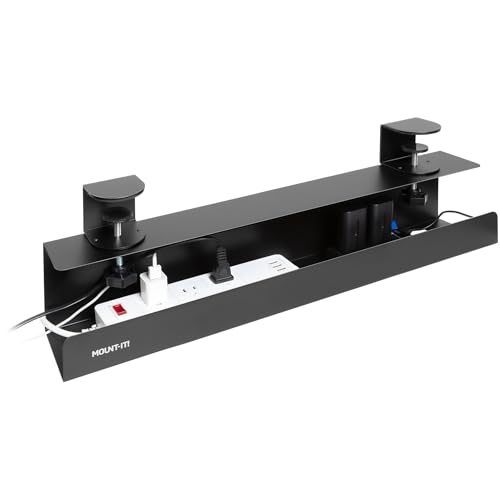
- Under Desk Cable Management Tray – No Drill, Clamp-On Installation. This under desk cabl…
- More Reliable Than Adhesive Cable Trays. Designed as a clamp on cable management tray, t…
- Dual-Facing Setup for Flexible Cable Access. Install this desk cable management tray fac…